Your AWS bill needs a kill switch

SwitchKiller shuts down cloud resources before spending gets out of control.

switchkiller.com/resources/payment-worker

payment-worker went over budget

Sep 17, 2026, 2:06 PM UTC · $1,003.57 of $1,000.00 / month

1 stopped
$1,003.57 over 30d · Budget $1,000.00 / month
Confirmed by AWS through Sep 16

Why this happened

Invocations
201,384,898
Avg duration
287 ms
Memory
1,024 MB
AWS rate
$0.20 / M requests

At us-east-1 rates that was estimated to cost $1,003.57, over your $1,000.00 budget. We set reserved concurrency to 0.

How this is calculated

Lambda is billed in two parts: requests, and duration priced in GB-seconds. You are charged for each time the function runs, and for the function's memory usage during the time it is running.

Requests
$40.28
201,384,898 × $0.20 per million
Duration
$963.29
201,384,898 × 287 ms × 1,024 MB = 57,797,466 GB-s × $0.0000166667
Total
$1,003.57

Rates are those recorded when we collected each sample, not today's. This counts requests and duration only. Ephemeral storage and data transfer bill separately and are not included, and free tier and savings plans are not applied, so this estimate can differ from your AWS final bill. The kill switch acts on this estimate because it is the only figure that is fresh; what AWS actually charged shows on the function's chart once reported.

Saved incident snapshot. Editing today's budget does not change this record. Costs are our estimate at the moment we acted, not an AWS invoice; AWS's confirmed figure for these hours appears on the resource's chart once reported.

Restore

payment-workerStopped

Lambda · us-east-1 · $1,003.57 this month

Saved concurrency: unreserved. Reserved concurrency set to 0.

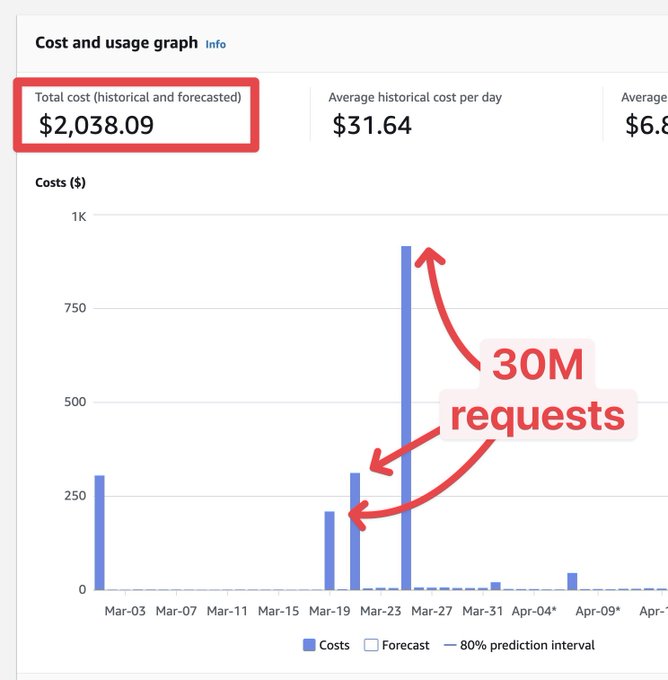
Runaways happen to someone every week

How it works

Stop a runaway bill in 3 steps

1Resources:
2 SwitchKillerRole:
3 Type: AWS::IAM::Role
4 # read metrics, stop resources

1. Connect your AWS account

One-click CloudFormation stack. We only get a scoped role to read your metrics and stop a resource.

payment-workerProtected
$1,000.00/ month

2. Set a budget

Pick a resource or a whole app and set a budget.

Stopped

3. We stop the bleed

If spend crosses the line we stop the resource. Nothing is deleted, nothing is reconfigured, and one click puts it back.

SwitchKiller for AI agents

Connect SwitchKiller to Cursor, Claude Code or Codex with MCP. Ask in plain English to protect your resources, analyse budgets and restore what was stopped.

Connect with MCP

switchkiller.com

I received an alert saying my S3 bucket is at 80% of its monthly budget. Can you check what's happening?

I received an alert saying my S3 bucket is at 80% of its monthly budget. Can you check what's happening?

Checking the alert

Your last sample is 40 seconds old. I'll confirm the spend against your budget, then read the per-minute series to find when it changed.

AI agent using SwitchKiller tools$50.00

Reading spend against budget

$50.00 of $50 · stopped

Reading the per-minute series

38,000/min · normally ~400/day

Reading the incident

stopped 09:22 · $50.00

Worked for 11s

assets-public was serving 38,000 requests a minute — it normally serves about 400 a day. That's $44 an hour on a bucket that usually costs you $10 a month. Your bucket was stopped 2 minutes ago because it crossed the budget.

This looks like a DDoS attack and we prevented the hit.

08:21

traffic jumps

09:08

80% alert

09:22

stopped

Works with your favorite tools

AWS

Lambda
EC2
ARApp Runner
S3
RDS
Aurora

Resource based prices to match your growth

Billing period

Starter

$19/month

  • 3 AWS connections*
  • 10 resources
  • 1 team member
  • Real Time Tracking
  • Incident Audits
  • Email alerts
  • MCP
  • Slack alerts
Get started

Cancel any time.

Pro

$99/month

  • 10 AWS connections*
  • 100 resources
  • 1 team member
  • Real Time Tracking
  • Incident Audits
  • Email alerts
  • MCP
  • Slack alerts
Get started

Cancel any time.

Team

$299/month

  • Unlimited AWS connections*
  • 500 resources
  • Unlimited team members
  • Real Time Tracking
  • Incident Audits
  • Email alerts
  • API, CLI, MCP
  • Slack alerts
Get started

Cancel any time.

Need more? Talk to us

* A connection is equivalent to 1 region in an AWS account.

FAQ

  • Starter or Pro?

    Starter covers 3 connections and 10 resources, plenty for protecting small footprint projects. Pro raises that to 10 connections and 100 resources. If you run in multiple accounts and multi-region, or you have more than a handful of resources, you want Pro.

  • What counts as a resource?

    A resource is one instance of any AWS primitive available in Switchkiller that you have put a budget on. For example, 1 Lambda funtion counts as 1 resource.

  • What actually happens when a budget is hit?

    It depends on the service, and we detail it out before you set it up so that you can decide for yourself. In general terms we look to stop the service without taking destructive action.

    Stopping is disruptive by design, and a it might not stop every charge. For more details read our Terms of Service.

  • Can I undo it?

    Yes. Every stop is recorded with the configuration it had before, so restoring will bring the service back

  • What if SwitchKiller goes down while something is stopped?

    It stays stopped. The stop is a change we make inside your AWS account, not something we hold open from ours. You can manage services as you need from your AWS account or Terraform script, Switchkiller checks what's the status of the service constantly

  • What access do you need to my AWS account?

    One CloudFormation stack, launched from a link. It creates a role we assume with an external ID, scoped to reading usage and stopping and starting the services you protect. There are no console steps beyond the one click, and you can read every permission in the template before you launch it.

  • How do you estimate my AWS consumption?

    Two figures, composed. We read in real-time (1-10 minutes) how much of each meter a resource used and multiply it by AWS's own published rate for that meter in that region, taken from AWS's pricing API and recorded against each sample so usage is always priced at the rate that applied when it happened. That number exists within a minute, which is what makes acting on it possible at all. Then AWS's Cost and Usage Report arrives, hours behind. Once an hour is old enough that AWS has stopped restating it, we replace our estimate for that hour with AWS's own figure. Recent spend is our arithmetic, older spend is AWS's, and the budget reports shows you which is which. The estimate stays deliberately conservative: free tier and savings plans are not applied, and each service lists the meters it does not count

  • How quickly do you act?

    In general, we sample every minute and act immediately after we detect a budget is crossed, however once we request the stoppage, AWS is ultimately responsible for turn it in off. In our experience some services take longer than others to completely stop, usually in the range of a few minutes

  • Can you see my data?

    No. We read CloudWatch metrics and your Cost and Usage report. We never read objects in your buckets or rows in your databases, and the role the stack creates cannot.

  • Will it stop something it should not?

    It stops what you configured, at the budget you set, and nothing else. Before you configure anything we show what the stop does to that specific resource and the actions we cannot take

  • Is there a free trial?

    No. Subscribe, and you can cancel any time. Cancelling keeps your access to the end of the period you paid for. The demo on this page is the real interface with real arithmetic, so you can see what it does before you decide.

Stop worrying about your AWS bill

Get started